Ledger Nano S Plus: Affordable Hardware Wallet for Secure Crypto Storage
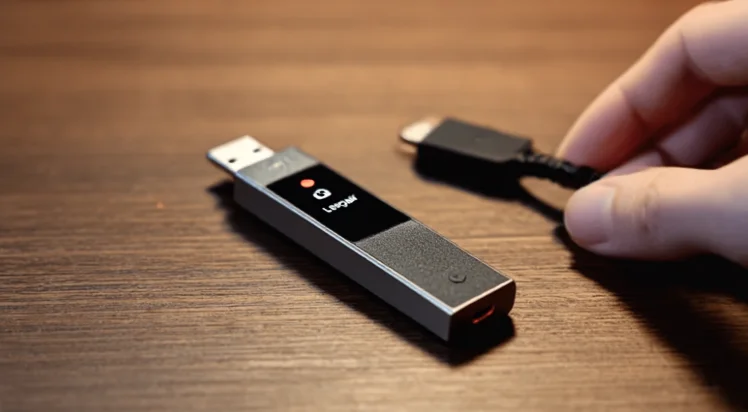
The Ledger Nano S Plus delivers premium cold storage security at an accessible price point, making it the ideal entry into hardware wallet ownership. As the successor to the original Ledger Nano S, this updated ledger nano device offers substantially increased storage capacity, an upgraded secure element chip, and a larger display while maintaining the compact USB-driven design. For cryptocurrency holders prioritizing security over wireless connectivity, the ledger nano s plus provides bank-grade protection for digital assets.
What Is the Ledger Nano Series?
The Ledger Nano series represents the core product line from Ledger, a French cybersecurity company specializing in cryptocurrency protection. These hardware wallets store private keys in an isolated secure element chip, keeping cryptographic credentials completely disconnected from internet-connected devices. The nano designation refers to the compact form factor resembling a USB flash drive.
Since 2016, Ledger has sold over 6 million hardware wallets globally, establishing itself as the market leader in consumer-grade cold storage. The Nano series appeals to individual investors who want direct custody of their cryptocurrency rather than trusting exchanges with their assets. Compare all models on our comparison page.
Evolution from Nano S to Nano S Plus
The original Ledger Nano S launched in 2016 and became the best-selling hardware wallet in history. However, its limited 320KB memory restricted users to 3-6 applications simultaneously. Ledger released the Nano S Plus in April 2022 to address these limitations while maintaining the affordable price point.
Key improvements in the S Plus include 8x more memory (1.5MB vs 320KB), enabling 100+ simultaneous apps. The device features a larger screen (128x64 vs 128x32 pixels) for easier transaction verification. Ledger upgraded the secure element to ST33K1M5 with CC EAL6+ certification. USB-C replaced the older micro-USB port.
Ledger Nano S vs Nano S Plus: Key Differences
Understanding the differences between these models helps buyers make informed decisions. For a complete comparison including the Nano X, see our detailed guide:
| Feature | Ledger Nano S | Ledger Nano S Plus |
|---|---|---|
| Release Date | 2016 | April 2022 |
| Memory | 320 KB | 1.5 MB |
| App Capacity | 3-6 apps | 100+ apps |
| Screen Resolution | 128 x 32 pixels | 128 x 64 pixels |
| Secure Element | ST31H320 (CC EAL5+) | ST33K1M5 (CC EAL6+) |
| Connector | Micro-USB | USB-C |
| Bluetooth | No | No |
| Battery | None | None |
| NFT Support | Limited | Full (Clear Signing) |
| Price | Discontinued | $79 USD |
| Status | Legacy | Current model |
The original Nano S has been discontinued by Ledger as of 2023. Current buyers should purchase the Nano S Plus.
Ledger Nano S Plus Technical Specifications
The Nano S Plus incorporates latest-generation components delivering security comparable to the flagship Nano X. See our comparison for detailed specifications:
- Dimensions: 62.39mm x 17.40mm x 8.24mm (slightly smaller than Nano X)
- Weight: 21 grams (ultralight, portable design)
- Display: 128 x 64 pixel OLED screen for clear transaction details
- Memory: 1.5 MB flash storage supporting 100+ applications
- Connector: USB Type-C port for universal compatibility
- Supported assets: 5,500+ coins and tokens across 500+ apps
- Compatible platforms: Windows 10+, macOS 10.14+, Linux (64-bit)
- Mobile support: Android 8.0+ via USB OTG cable (no iOS wired support)
Secure Element and Certification
The ST33K1M5 secure element chip carries CC EAL6+ certification from ANSSI (French National Cybersecurity Agency). This represents the highest security level available in consumer hardware wallets. The secure element isolates cryptographic operations from the device's main processor, ensuring private keys remain protected even if firmware were compromised.
How to Set Up Ledger Nano S Plus
Initializing the Nano S Plus takes approximately 15 minutes:
- Inspect packaging for tampering and verify all components: device, USB-C cable, recovery sheets (x3), quick start guide.
- Download Ledger Live desktop application from ledger.com/ledger-live. Verify the website URL.
- Connect the Nano S Plus to your computer using the included USB-C cable. Device powers on automatically.
- Select 'Set up as new device' on the screen. Use both physical buttons to navigate.
- Create your PIN code (4-8 digits). Choose a memorable but unpredictable combination.
- Write your 24-word recovery phrase on all three provided recovery sheets. Store in different secure locations.
- Confirm your recovery phrase by selecting words when prompted. Prevents transcription errors.
- Complete device pairing in Ledger Live and run genuine check to verify authenticity.
- Install cryptocurrency apps through Ledger Live's Manager section for assets you plan to store.
Who Should Buy the Ledger Nano S Plus?
The Ledger Nano S Plus serves as the optimal entry point into hardware wallet security without compromising essential features.
Ideal Use Cases
The Nano S Plus excels in several scenarios. Long-term holders benefit from secure cold storage without paying for Bluetooth features. Desktop-focused users who manage crypto exclusively from computers avoid wireless complexity. Budget-conscious investors get CC EAL6+ security at the lowest price. Multi-asset holders can install 100+ apps simultaneously. Backup device buyers often pair the S Plus with a Nano X as redundant recovery option.
When to Consider the Nano X Instead
Certain users benefit more from the Ledger Nano X despite its higher price. Mobile-first traders who primarily use smartphones need Bluetooth for iOS connectivity. Frequent transactors appreciate wireless convenience for regular portfolio management. iPhone users specifically require the Nano X since the S Plus cannot connect to iOS devices. See our complete Ledger model comparison for detailed guidance.
Where to Buy Ledger Nano S Plus
Purchase the Nano S Plus from Ledger's official website (ledger.com) or verified Amazon sellers to guarantee authentic devices. The current retail price is $79 USD with worldwide shipping. Ledger frequently offers bundle deals with accessories. Check our Ledger pricing and deals page for current promotions.
Avoid purchasing from unofficial resellers, eBay, or second-hand markets. Compromised devices with pre-generated recovery phrases have been used to steal cryptocurrency.
Frequently Asked Questions
Yes, the S Plus offers 8x more memory (100+ apps vs 3-6), larger screen, CC EAL6+ certification, and USB-C connectivity. The original has been discontinued.
The S Plus connects to Android phones (8.0+) via USB OTG cable. It cannot connect to iPhones—Apple restricts USB data from hardware wallets. For iPhone, use Nano X.
The S Plus supports 100+ applications simultaneously, a massive upgrade from the original Nano S which held only 3-6 apps.
CC EAL6+ represents the second-highest security certification for hardware, confirming the secure element resists sophisticated attacks.
Choose S Plus ($79) for desktop use without mobile needs. Choose Nano X ($149) for Bluetooth/smartphone management or iPhone use. Both provide equivalent security.
Yes, restore your wallet on the S Plus using your existing 24-word recovery phrase. Your crypto is on the blockchain, not the device.
Yes, the S Plus fully supports NFTs on Ethereum, Polygon, and other EVM networks with Clear Signing for transaction verification.